Composer a tool for dependency management in PHP that allows you to declare the libraries your project depends on and also manages (install/update) them for you.
On Windows, when global install of a library / package is done, composer stores the package in a Composer directory inside windows application data folders which by default is C:\Users\{user name}\AppData\Roaming.
Mind you, this folder is hidden, thus you will have to enable display of hidden folder to see it.
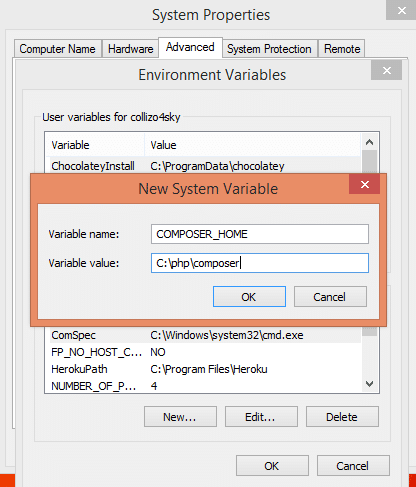
To change composer global package folder from %appdata% to say C:\php\composer, create a COMPOSER_HOME environmental variable with the value set to C:\php\composer.
The steps below explain how environmental variables are added in Windows.
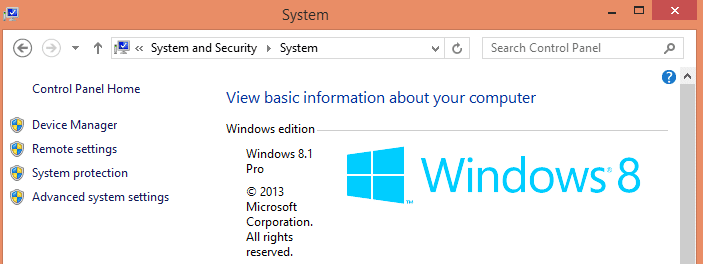
* Press Windows Key + Pause Break then click Advanced system Settings
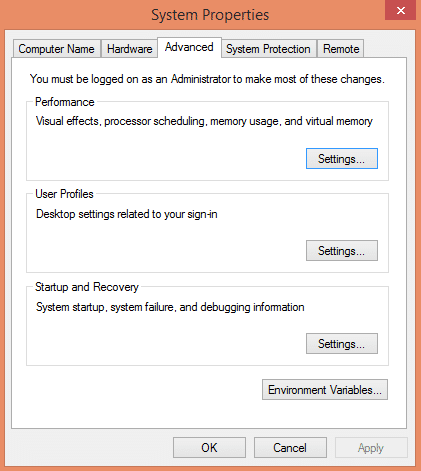
Click the Environmental variables button.
Under System variables, click New... button and add the environmental variable like so:
You might want to restart your PC for this to take effect.