Laravel Homestead has been my local development environment for years after switching from XAMPP.
I have been on version 0.4.4 for a long time and decided it was time to update or better put, to upgrade considering latest version is 2.1.x as at the time of writing and more importantly, to take advantage of latest versions of PHP, MySQL, NodeJS and other toolset.
Before upgrading, ensure you take backup of data that lives in your Homestead virtual machine such as MySQL database.
Let’s go over the steps in updating Homestead.
cdinto your Homestead directory (typically~/Homestead) and runvagrant box updatecommand to download the latest version of the Laravel Homestead Vagrant box.==> default: Checking for updates to 'laravel/homestead' default: Latest installed version: 0.4.4 default: Version constraints: >= 0.4.0 default: Provider: virtualbox ==> default: Updating 'laravel/homestead' with provider 'virtualbox' from version ==> default: '0.4.4' to '2.0.0'... ==> default: Loading metadata for box 'https://atlas.hashicorp.com/laravel/homestead' ==> default: Adding box 'laravel/homestead' (v2.0.0) for provider: virtualbox default: Downloading: https://atlas.hashicorp.com/laravel/boxes/homestead/versions/2.0.0/providers/virtualbox.box ==> default: Successfully added box 'laravel/homestead' (v2.0.0) for 'virtualbox'!- Once the download completed, you will be able to see the latest version by issuing
vagrant box listcommand.Collinss-MacBook-Pro:Homestead collizo4sky$ vagrant box list laravel/homestead (virtualbox, 0.4.4) laravel/homestead (virtualbox, 2.0.0)
- Still on
~/Homestead; If you installed Homestead source code by cloning the git repo, rungit pull origin masterto update the Homestead source code.
Because master could be unstable, ensure you are on a stable release by checking out the latest version viagit checkout v5.1.0where “5.1.0” is the latest release. - Run
vagrant destroycommand to destroy the existing Homestead environment.In my case, i got an error message that specifies the updated homestead box requires vagrant version >= 1.9.0. Updating vagrant fixed the problem. I also used the opportunity to also update Virtualbox.
I tried the command again and I got a “Vagrant failed to initialize at a very early stage: …” apparently due to incompatible versions of plugin dependencies. Running
vagrant plugin expunge --reinstallfixed it.I tried again and i got this error “Homestead settings file not found in /Users/collizo4sky/Homestead. Apparently, homestead do not store and lookup settings from
~/.homestead/Homestead.yamlwhich was the case in my previous installed version but from it install folder.
To fix this, i ranbash init.shto initialize homestead and then replace the content of~/Homestead/Homestead.yamlwith my previous settings in~/.homestead/Homestead.yaml. - Run
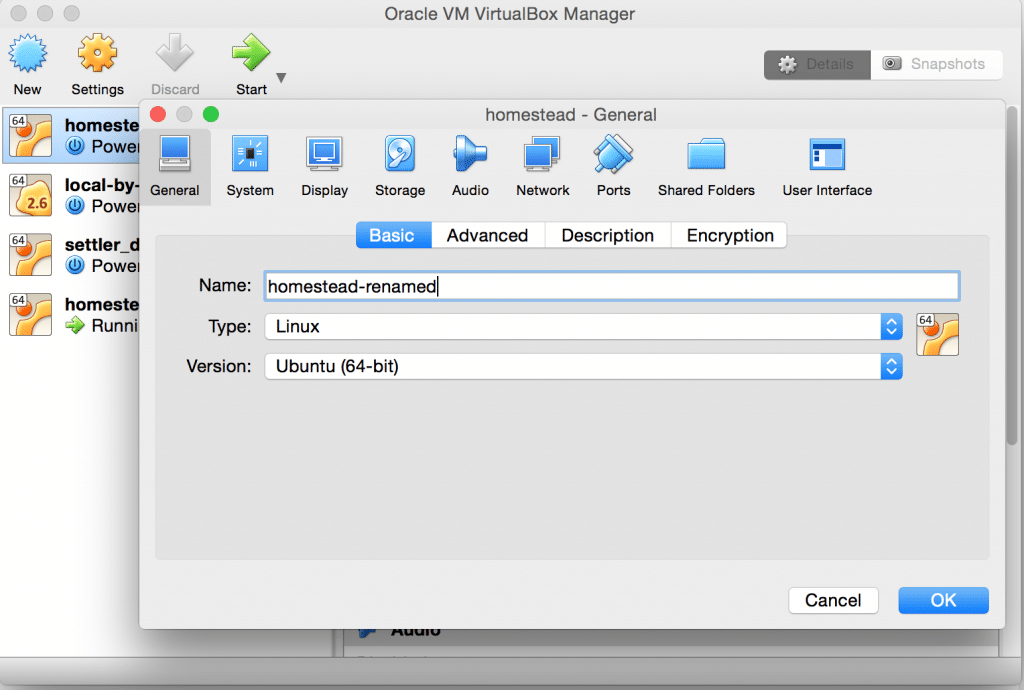
vagrant upcommand, which will bring up and provision the new Homestead Vagrant environment using the latest version of the box.In my case; after running the command, I got this error message “A VirtualBox machine with the name ‘homestead-7’ already exists. Please use another name or delete the machine with the existing name, and try again.“.
To fix this issue, I had to open virutalbox application and renamed the previous homestead image to a name other than “homestead-7”.
- After all the above rituals, running
vagrant upcommand should work flawlessly. - Don’t forget to remove older box version to free up space via
vagrant box remove laravel/homestead --box-version=0.4.4.
I advice you do this after confirming the the newer version is working fine.
With Laravel Homestead running, I restored my backup (in my case, it was just MySQL backup) and my sanity was restored.
This has been the bane of my day. I hope you found this post helpful.